Unlock Your Data: The Power of Converting PDF to Excel
Have you ever looked at a PDF report and wished you could instantly start analyzing the numbers or sorting the lists? The PDF format is fantastic for presenting information in a consistent way, but its static nature can turn a simple task into a frustrating chore. This is where the ability to convert PDF to Excel becomes a total game-changer, transforming fixed documents into flexible, usable spreadsheets.
From Static Reports to Dynamic Worksheets
A PDF report is like a printed photograph of your data—you can see everything clearly, but you can’t rearrange a single thing. When you convert PDF to Excel, you’re essentially taking that photo and recreating it as a living spreadsheet. This gives you the power to:
Analyze and Edit
Run calculations on sales figures.
Sort inventory lists by quantity or date.
Filter customer contact information.
This makes your data actionable, no longer trapped in a rigid, uneditable format.
Choosing the Right Conversion Tool
With so many options available, how do you find the right tool to convert a PDF to Excel? The best converters go beyond just copying and pasting text; they intelligently identify data structures.
Critical Features to Look For
Precision: A top-tier tool correctly identifies tables, rows, and columns, keeping your data perfectly aligned.
Security: Your data is important. Choose a service that uses secure connections and guarantees the deletion of your files after the conversion is complete.
Speed: Time is valuable. An efficient converter will handle the process in seconds, not minutes.
These features ensure that the conversion process is not just fast but also accurate and safe.
The Seamless Conversion Process
You Don’t need to be a tech expert to convert PDF to Excel.
The process is designed to be incredibly straightforward, requiring only a handful of simple actions.
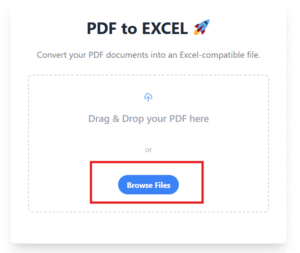
Get It Done in 3 Steps
Upload Your File: Drag and drop your PDF or select it from your computer.
Initiate Conversion: The tool’s engine processes the document.
Download Your Excel File: Save the newly created spreadsheet and start working.
This simple workflow eliminates the need for any manual data entry, giving you more time to focus on your actual tasks. By using a reliable converter, you can make your workflow smoother and your data more manageable.
You can Also try our other tools.
All Tools Created by TOP ONE NETWORK