The Ultimate Guide to Free PDF to ZIP Conversion: Fast, Easy, and Secure
In today’s digital world, managing documents efficiently is a top priority for everyone, from students to professionals. You often find yourself with multiple PDF files—reports, assignments, presentations, or invoices—that need to be shared, stored, or sent via email. The challenge? Sending dozens of individual files can be messy and time-consuming. The best solution is to bundle them all together into a single, compressed archive, and the most common format for this is a ZIP file.
While your computer has built-in tools for creating ZIP files, they often involve multiple steps and can be clunky, especially when dealing with a large number of PDFs. This is where a specialized online tool, a Free PDF to ZIP Converter, becomes a game-changer. These converters are designed to streamline the process, making it fast, secure, and incredibly simple.
Why You Need a Dedicated Free PDF to ZIP Converter
The appeal of a dedicated converter goes beyond simple convenience. It addresses key pain points that people face when managing their digital documents.
Save Time and Effort
Imagine you have 20 different PDF chapters of a book to send to a colleague. Manually selecting each file, right-clicking, and then “zipping” them can be a tedious process. A specialized online tool automates this. You simply upload all your files at once, and the converter does the rest in a matter of seconds. This automation saves you valuable time and reduces the risk of human error, ensuring no file is left behind.
Enhance Security and Privacy
When you’re dealing with sensitive documents, security is a major concern. Reputable online converters prioritize your privacy. They use advanced encryption protocols to protect your files during the conversion and transfer process. After the conversion is complete, these services are designed to automatically and permanently delete your files from their servers, so you don’t have to worry about your data being stored or accessed by a third party.
Improve Organization and Storage
A single ZIP file is much easier to manage than dozens of loose PDFs. It simplifies your digital workspace, making it easier to back up files, share them with others, or simply keep your folders neat and organized. This is especially useful for project-based work where all related documents need to be kept together.
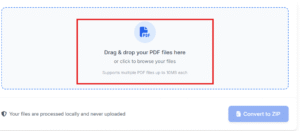
How Our Free PDF to ZIP Converter Works: A Step-by-Step Guide
We designed our Free PDF to ZIP Converter with you in mind, focusing on a user-first approach.
. We’ve eliminated unnecessary steps and complicated interfaces to give you a tool that’s not only powerful but also intuitive. Here’s how you can convert your PDFs to a ZIP file in just a few clicks.
Step 1: Access the Converter
Simply navigate to our website. There’s no need to download any software, register an account, or provide personal information. The tool is available right in your web browser, making it accessible from any device.
Step 2: Upload Your PDF Files
Click the “Choose Files” button. A file explorer window will pop up, allowing you to select the PDF documents you want to convert. You can upload files directly from your computer, or if your files are in the cloud, you can connect your Google Drive or Dropbox account for seamless integration. Our converter supports batch processing, so you can select a single file or a hundred files—it’s all the same to us.
Step 3: Initiate the Conversion
Once your files are uploaded, our system gets to work automatically.
Once the files are uploaded, the system automatically starts combining and compressing them into a single ZIP archive.
There’s no need to click another button or wait for a “start” command.
After uploading your files, the entire process runs on its own, making it super convenient for you.
Step 4: Download Your ZIP File
The conversion is incredibly fast, often taking as little as two seconds. A download link will appear as soon as the process is complete.
Simply click the “Download” button to save the new ZIP file directly to your device.
. You can then open the ZIP file with any standard extraction software to access all your original PDF documents, now neatly contained in one compressed folder.
The Key Features That Set Our Tool Apart
You will find many free converters, but their quality and reliability often differ.
Our Free PDF to ZIP Converter is packed with features designed to provide a superior user experience.
Lightning-Fast Performance: Our servers are optimized for speed, ensuring that even large files are converted in record time. You won’t be left waiting around for your files to process.
100% Free and Unrestricted: We believe that essential tools should be accessible to everyone.
There are no hidden costs, subscriptions, or watermarks. Our service is completely free to use.
Ultimate Security: We use HTTPS encryption to secure your data during upload and download. All files are automatically deleted from our servers within minutes of conversion, providing you with peace of mind.
Cross-Platform Compatibility: Whether you’re on a Windows PC, a MacBook, a Linux machine, or even a smartphone or tablet, our web-based tool works perfectly across all devices and operating systems. All you need is a browser.
User-Friendly Interface: The design is clean, minimalist, and easy to navigate.
The tool has a clean interface, with no confusing menus or distracting ads.
. The focus is entirely on getting your files converted quickly and efficiently.
A Final Thought on Efficiency
In a world where time is a valuable commodity, having tools that simplify your workflow is crucial. Our Free PDF to ZIP Converter is more than just a utility; it’s a solution that saves you time, protects your data, and helps you stay organized. It’s the simplest, most secure, and fastest way to convert your PDFs into a single, manageable ZIP file.
Discover the difference by giving it a try today.
You can also try PDF to CSV or PDF to HTML
All Tool By TOP ONE NETWORK